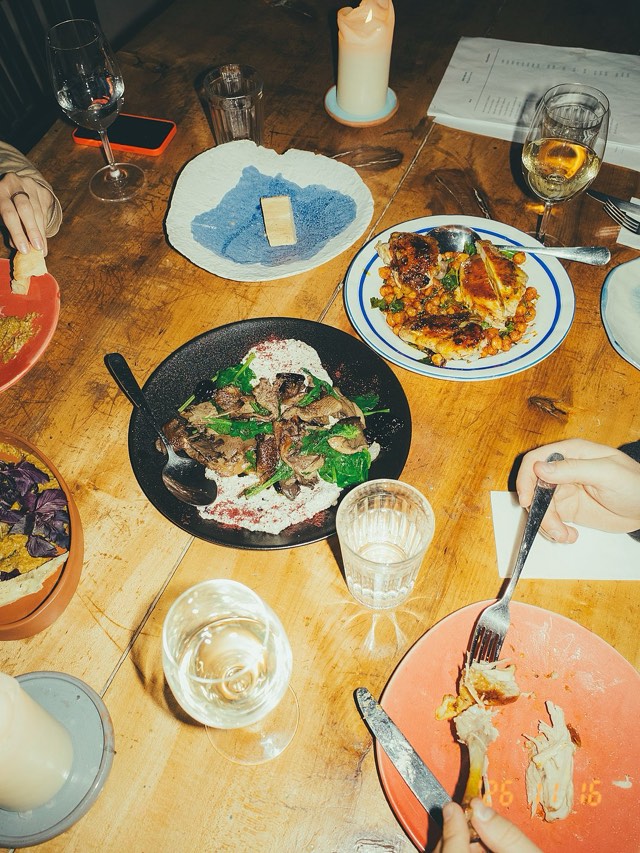
The best Friendsgiving photo ideas follow the night in order: the table from above before anyone sits down, candid flash portraits at the door and during the toast, a group photo with the iPhone timer, the kitchen chaos, and the leftovers at midnight. For the film or digicam party look, set the flash to On, stand close, and shoot straight at people. At the end, put four of the shots in a photo strip.
Key takeaways
- Shoot the table first, from straight above, while it's still perfect. Five minutes later it never looks that good again.
- For candid party shots, keep the flash On and stay close to people. Our iPhone flash guide covers the settings.
- For the group photo, prop the phone at eye level and use Timer, 10 seconds. Apple's path: swipe up from the camera modes, tap Timer, then 10.
- The messy moments make the photo dump: pans in the sink, a fridge raid, the last slice.
- Four shots from the night fit a classic photo booth strip.
Before guests arrive: set the camera once
Friendsgiving is new as a word, even if the meal isn't. Merriam-Webster started tracking "Friendsgiving" in 2007 and added it to its dictionary in 2020, 13 years after its first known use, NPR reports. Etiquette expert Lizzie Post told NPR that paper plates in front of a football game or a formally set table "matters not. It's the gathering that makes the big difference" (NPR). The messy version photographs better anyway.
Set up the phone before the doorbell rings, so you're not fiddling with menus later:
- Flash On. Tap the Flash control above the camera frame and switch it from Auto to On (Apple). Apple says turning the flash on turns Night mode off, so you keep the hard party flash look (Apple).
- 4:3. Swipe up from the camera modes, tap Aspect and pick 4:3, the shape of most 2000s digicam photos.
- Grid and Level. Go to Settings > Camera and turn on Grid and Level. It helps with the table shot.
Some photographers also like to stop checking the screen after each shot, the way you would with a disposable. Our disposable camera look guide explains that habit.
Thanksgiving table photos from above
When: after the last dish lands and before the first person sits.
Where to stand: at the end of the table, phone held flat and straight down over the middle. If you can't get high enough, stand on a sturdy chair. If you still can't fit the whole table, tap 0.5x. Apple says the 0.5x button is there "on supported models" (Apple). Use the grid to keep the table edge parallel to the frame.
Light: if dinner starts in daylight, turn the flash off and let the window do the work. After dark, turn the flash On. Plates shine and the room around the table falls dark, like an old point-and-shoot dinner photo.
Second version: shoot the same table again at the end, from the same spot: empty glasses, crumpled napkins, a half-eaten pie. Before and after, side by side, is the classic photo dump pair.
Candid flash portraits
Candid means people aren't posing yet. Three moments work well:
- The arrival. Stand inside the front door, about 1–2 m (3–6 ft) back. Shoot each guest as they walk in with a coat still on and a dish in their hands. The hallway behind them goes dark in the flash.
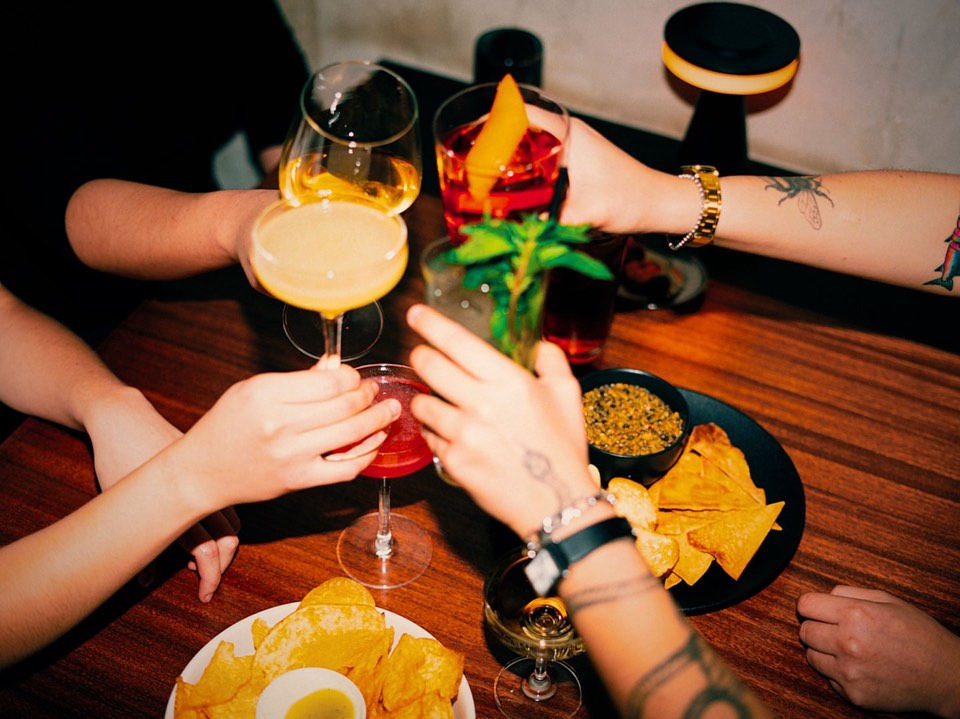
- The toast. Stand at one end of the table, at seated eye level, and shoot down the table as the glasses go up. Hit the shutter as glasses meet, not after.
- The laugh. Halfway through dinner, wait for a big story to land. Shoot the person listening, not the one talking.
Aim straight at faces: the flat, frontal light is the look. For why an iPhone LED looks softer than an old compact's flash, and what to do if it won't fire, see our flash guide.
The group photo with the iPhone timer
Do it right after the toast, when everyone is still at the table and before anyone goes back for seconds.
- Find a stand. Prop the phone on a shelf, a stack of books or a counter at the end of the table, about seated eye level.
- Arrange people. Pull everyone to the far side and the two ends of the table, so nobody has their back to the camera. People closest to the phone sit, people at the back stand.
- Set the timer. Open Camera, tap the Camera Controls button or swipe up from the camera modes at the bottom of the screen, tap Timer, then tap 3, 5 or 10. Pick 10 so you can walk around the table (Apple).
- Start it. Tap the Shutter button, then get in the frame. To turn the timer off later, open the same menu, tap Timer and tap the timer icon.
- Shoot it twice. One nice, one silly.
Leave the flash On if the room is dark. With everyone 1–2 m from the phone, the faces get the light and the room behind stays dim. If you have an Apple Watch, Apple says you can use its Camera Remote to take the photo, so you can shoot from your seat (Apple).
Kitchen chaos and leftovers
The shots people forget make a Thanksgiving photo dump feel real.
The kitchen during cooking
Stand in the kitchen doorway with the flash On and shoot the whole scene: steam, three people at one stove, someone tasting gravy off a spoon. Then go close for details: flour on a hand, the timer on the oven, a pile of pans.
The dishes
After dinner, shoot the sink from above, the same way you shot the table. A full sink and a full dish rack are the honest end of the night.
The leftovers at midnight
Turn the kitchen light off and open the fridge. Shoot a friend in the fridge glow, fork in hand. Two choices here:
- Flash Off for the moody, fridge-lit version. Apple says Night mode "automatically turns on when the camera detects a low-light environment," so hold the phone still while it shoots (Apple).
- Flash On for the disposable look: a bright face, the fridge shelves sharp, the rest of the kitchen black.
Then line up the leftover boxes on the counter and shoot them from above, with a hand writing names on the lids. Pets begging at your feet count too.

A photo strip of the night
A photo booth strip is the simplest Friendsgiving photo booth idea: no backdrop, no props, just four frames that tell the night. Pick them in order:
- The table from above, before.
- A flash portrait from the arrival or the toast.
- The group shot from the timer.
- The leftovers at midnight.
Our free photo strip maker puts three or four photos into a vertical or horizontal strip, with a caption and the date at the end. It saves at 2 × 6 inches at 300 pixels per inch (600 × 1800 pixels for the vertical strip), and nothing is uploaded. Write "Friendsgiving" as the caption, print two strips side by side on a 4 × 6 photo, and cut them in half: one for you, one for the host.
For a 10-photo dump instead, keep the same order and fill the middle: table, arrival, kitchen, toast, group shot, a plate close-up, the laugh, the pets, the dishes, the fridge.
Shoot it with a retro camera
The iPhone gets you close, but the color and flash still look like a phone. For a date in the corner of the frame, the S-500 in DCIM adds warm 2005 digicam color and an orange date stamp straight from the camera.
FAQ
What are good Friendsgiving picture ideas?
The table from above before anyone sits, guests arriving with their dishes, the toast, a timer group photo, the kitchen, the dishes and the leftovers at midnight.
How do I take a group photo at Thanksgiving with my iPhone?
Prop the phone at seated eye level at the end of the table. Swipe up from the camera modes, tap Timer, then tap 10. Tap the Shutter button and get in the frame.
How do I take Thanksgiving table photos?
Shoot from straight above, right before people sit. Use the grid to keep it straight, and tap 0.5x if your iPhone has it and the table doesn't fit. Window light by day, flash after dark.
What's a cheap Friendsgiving photo booth idea?
Skip the backdrop. Turn four photos from the night into a photo booth strip with a caption and the date.
How do I make Friendsgiving photos look like film?
Turn the flash On, get close, shoot straight at people, and don't check every shot.
Sources
- Apple. Use iPhone camera tools to set up your shot. iPhone User Guide (iOS 27). Accessed November 22, 2026.
- Apple. iPhone camera basics. iPhone User Guide (iOS 27). Accessed November 22, 2026.
- Apple. Use Night mode on your iPhone. Apple Support. Accessed November 22, 2026.
- Rachel Treisman, NPR. Friendsgiving 101: A history of the made-up holiday and how to celebrate it. November 19, 2025. Accessed November 22, 2026.